Every year, millions of students Google “what programming language should I learn first?” And every year, the answer is the same: Python.
But knowing what to learn and knowing how to learn it are two completely different problems. Plenty of beginners start Python, watch a few tutorials, then stall — not because Python is hard, but because nobody gave them a clear, step-by-step path from zero to job-ready.
This guide fixes that. Whether you’re a student preparing to enter the tech industry, a fresher looking for your first developer role, or someone switching careers entirely, this Python roadmap for 2026 lays out exactly what to learn, in what order, with realistic timelines and career outcomes.
In this guide, you’ll learn what Python is, why it’s worth your time in 2026, the complete learning roadmap broken into clear stages, the libraries and tools that matter, real project ideas to build your portfolio, and what salaries you can realistically expect.
What Is Python — And Why Does Everyone Keep Talking About It?
Python is a high-level, interpreted programming language known for two things that rarely come together: simplicity and power. Its syntax reads almost like plain English, which makes it the most beginner-friendly serious programming language available today. At the same time, it powers some of the most sophisticated technology in the world — from Google’s search infrastructure to NASA’s data pipelines to ChatGPT’s training stack.
Here’s where Python is actively used in the real world:
- Web Development — building websites and backend APIs (Instagram, Pinterest, and Spotify all use Python on the backend)
- Data Analysis — processing and making sense of large datasets
- Artificial Intelligence and Machine Learning — training intelligent systems and models
- Automation — eliminating repetitive manual tasks at scale
- Cybersecurity — building tools for ethical hacking and vulnerability detection
- Cloud Computing and DevOps — scripting infrastructure and deployment pipelines
- Internet of Things (IoT) — programming smart devices and embedded systems
- Game Development — prototyping and building simple to mid-level games
No other programming language gives a beginner access to this many high-demand fields from day one.
Why Learn Python in 2026 Specifically?
Some people worry they’ve “missed the window” on Python. They haven’t. If anything, 2026 is one of the best years to start, for a specific reason: AI has made Python more important, not less.
Every major AI framework — TensorFlow, PyTorch, LangChain, Hugging Face — is Python-first. Every company trying to integrate AI into its products (which is most of them now) needs Python developers who understand both the language and the ecosystem around it. Python skills combined with even basic AI/ML knowledge put you in a completely different league from traditional developers.
Beyond AI, the fundamentals hold: Python is consistently ranked among the top 3 most-used languages globally. According to the TIOBE Index and Stack Overflow Developer Survey, Python has led or co-led the charts for five consecutive years. Developer jobs listing Python as a requirement have grown year-over-year with no sign of slowing.
The bottom line: Python is not a trend. It’s infrastructure — and infrastructure doesn’t go out of style.
Explore HTS India’s Python with AI & ML course.
Skills You’ll Build as a Python Developer
Before jumping into what topics to study, it helps to understand what kind of thinker Python will make you. These are the core skills you develop through Python learning — skills that transfer to every tech role, not just Python jobs:
| Skill | Why It Matters |
| Logical Thinking | Breaking any problem into smaller, solvable steps |
| Problem Solving | Finding efficient solutions, not just working ones |
| Programming Fundamentals | The foundation that makes every other language easier to learn |
| Debugging | Reading errors as information, not failures |
| Algorithms & Data Structures | Writing code that doesn’t just work, but works fast |
| Object-Oriented Programming | Thinking in systems, not just scripts |
| File & Data Handling | Working with real-world data in all its messy formats |
| Communication | Explaining technical decisions to non-technical teammates |
Setting Up Your Python Environment
Before writing a single line of code, you need the right setup. Here’s what to install:
Essential Installations
- Python 3.x — Always install the latest stable Python 3 version from python.org. Do not use Python 2.
- Visual Studio Code (VS Code) — The most popular, free, and lightweight code editor. Install the Python extension from Microsoft once inside.
- Jupyter Notebook — Essential for learning, data analysis, and AI work. Lets you write and run code in interactive “cells.”
Optional but Useful
- PyCharm — A more feature-rich IDE specifically built for Python. Great for larger projects.
- Anaconda — A Python distribution that comes pre-packaged with data science libraries and Jupyter. Saves setup time.
Developer Tools to Know Early
- pip — Python’s package installer (how you add libraries)
- virtualenv — Creates isolated environments so different projects don’t interfere with each other
- Git and GitHub — Version control. Non-negotiable for any professional Python developer.
The Complete Python Learning Roadmap — Step by Step
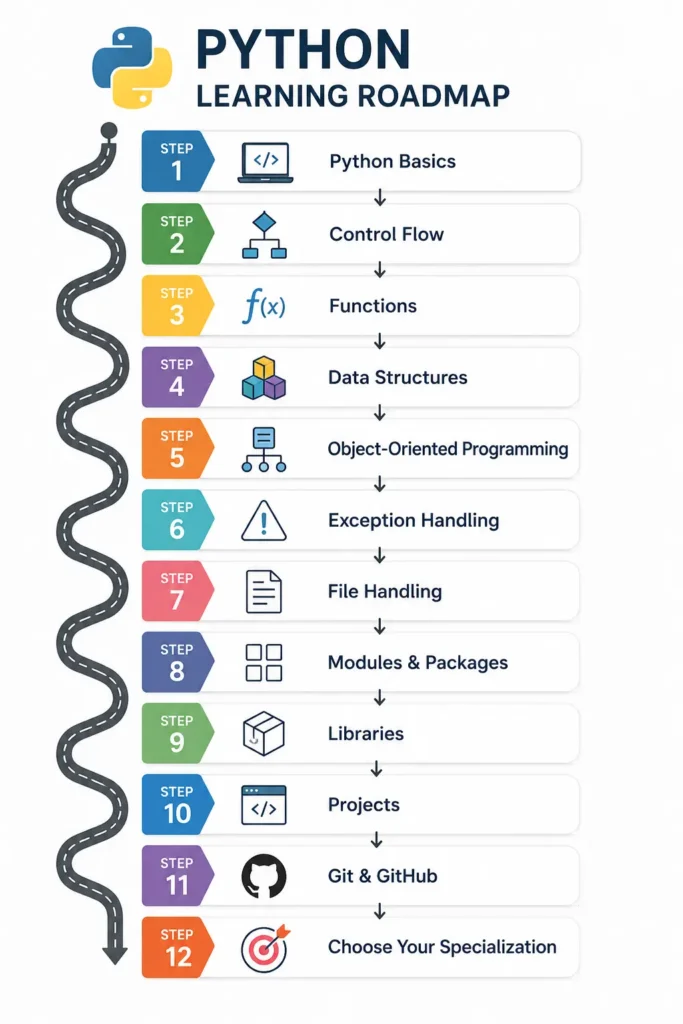
This is the core of this guide. Follow this sequence and you won’t waste time jumping between random tutorials.
Stage 1: Python Basics
This is your foundation. Don’t rush it.
Learn these topics in order:
- Variables and Data Types — integers, floats, strings, booleans
- Input and Output — input(), print(), formatting strings
- Type Conversion — converting between data types
- Operators — arithmetic, comparison, logical, assignment
- Comments and Indentation — Python enforces indentation as part of syntax, unlike most other languages
- Naming Conventions — how to name variables and functions the “Python way” (PEP 8)
A note on mindset: Most beginners want to rush past Stage 1 to get to “the interesting stuff.” Don’t. Every complex Python program — including AI systems — is built on these basics. A shaky foundation here creates confusion at every stage after.
Stage 2: Control Flow
Control flow is how your program makes decisions and repeats tasks.
- Conditionals: if, if-else, elif, nested if
- Loops: for loops, while loops
- Loop Controls: break (exit the loop), continue (skip to next iteration), pass (placeholder)
Once you can write a program that makes decisions and repeats actions, you can start building real, useful scripts.
Stage 3: Functions
Functions let you write code once and reuse it anywhere. This is where programming starts to feel like problem-solving rather than typing.
- Defining and calling functions
- Parameters, arguments, and return values
- Default and keyword arguments
- Lambda functions — small, anonymous one-line functions
- Recursion — functions that call themselves (used in algorithms and tree structures)
- Variable scope — understanding local vs. global variables
Stage 4: Data Structures
Python’s built-in data structures are one of its greatest strengths. Master all four:
- Lists — ordered, changeable collections. The workhorse of Python data storage.
- Tuples — like lists, but immutable (can’t be changed). Used for fixed data.
- Sets — unordered collections with no duplicates. Great for membership checks.
- Dictionaries — key-value pairs. The backbone of JSON handling, APIs, and configuration.
- Strings — technically a sequence type, with powerful built-in methods
Also learn:
- Sorting and searching
- Slicing and indexing
- List comprehensions — a Pythonic way to create lists in one clean line
- Dictionary comprehensions — same idea applied to key-value pairs
Stage 5: Object-Oriented Programming (OOP)
OOP is how you organize large, complex programs into manageable pieces. Every major Python library — Django, FastAPI, SQLAlchemy — is built using OOP principles.
Core concepts to master:
- Classes and Objects — the blueprint and the instance
- Constructors (__init__) — how an object is created and initialized
- Encapsulation — hiding internal details, exposing only what’s needed
- Inheritance — child classes that inherit and extend parent class behavior
- Polymorphism — the same method name behaving differently in different classes
- Abstraction — simplifying complex systems by exposing only relevant parts
- Method Overriding — redefining a parent method in a child class
Understanding OOP with real projects with HTS India.
Stage 6: Exception Handling
Real programs fail. Exception handling is how you make them fail gracefully instead of crashing.
- try / except blocks
- else — runs only if no exception occurred
- finally — always runs, whether an exception occurred or not
- raise — manually trigger an exception
- Custom exceptions — defining your own exception types for specific scenarios
Stage 7: File Handling
Most real applications work with data stored in files. Learn to:
- Read and write plain text files
- Work with CSV files (comma-separated values — the most common data format)
- Parse and generate JSON files (the language of APIs)
- Handle Excel files using the openpyxl library
Stage 8: Modules and Packages
Python’s module system is what unlocks its entire ecosystem.
- import and from…import syntax
- Creating your own modules and packages
- Understanding __init__.py
Built-in modules every Python developer uses:
| Module | What It Does |
| math | Mathematical functions |
| random | Generating random numbers and choices |
| os | Interacting with the file system |
| datetime | Working with dates and times |
| collections | Specialized data structures (Counter, defaultdict, deque) |
| pathlib | Modern, cleaner file path handling |
| sys | System-level operations and arguments |
Stage 9: Python Libraries
This is where Python specializes. Once you know the core language, libraries let you do in 5 lines what would otherwise take 500.
For Data Science and AI:
| Library | Purpose |
| NumPy | Numerical computing — arrays, matrices, mathematical operations |
| Pandas | Data manipulation and analysis — the Excel of Python |
| Matplotlib | Static data visualization — charts, plots, graphs |
| Plotly | Interactive, web-ready charts |
| Scikit-learn | Classical machine learning — regression, classification, clustering |
| TensorFlow | Deep learning and neural networks (Google) |
| PyTorch | Deep learning and neural networks (Meta) |
| OpenCV | Computer vision — image and video processing |
For Web Development:
| Library | Purpose |
| Flask | Lightweight, beginner-friendly web framework |
| Django | Full-featured web framework with built-in admin, ORM, auth |
| FastAPI | Modern, fast API framework — becoming the industry standard |
| Streamlit | Turn Python scripts into shareable web apps instantly |
For Automation and Data Collection:
| Library | Purpose |
| Requests | Making HTTP requests — working with APIs |
| BeautifulSoup | Web scraping — extracting data from websites |
| Selenium | Browser automation — mimicking human interaction with websites |
For Database and Testing:
| Library | Purpose |
| SQLAlchemy | ORM — interact with databases using Python instead of raw SQL |
| pytest | Testing framework — writing and running automated tests |
Stage 10: Build Projects
This is the most important stage. Projects are how you cement every concept you’ve learned and how you prove your skills to employers.
Start simple, then go deeper:
Beginner Projects (Months 1–3)
- Calculator
- Number Guessing Game
- Password Generator
- To-Do List App
- Student Grade Calculator
- ATM Simulation System
- Contact Book
- Quiz Application
Intermediate Projects (Months 4–6)
- Weather App (using a real weather API)
- Expense Tracker with file storage
- Library Management System
- File Organizer (auto-sorts files into folders by type)
- Email Automation Tool
- Web Scraper (scrapes product prices or news headlines)
Advanced Projects (Months 7–9)
- REST API with FastAPI (deployed on a cloud platform)
- E-commerce Backend with a database
- AI Chatbot using OpenAI or Anthropic APIs
- Resume Screening System using NLP
- Personal Finance Dashboard with data visualization
- Face Recognition System using OpenCV
Pro tip: Don’t just build these and forget them. Put every project on GitHub with a proper README. This is your portfolio — the thing hiring managers look at when your resume doesn’t have experience yet.
Stage 11: Git and GitHub
Knowing Python without knowing Git is like knowing how to cook but never owning a kitchen. Git is how the entire software industry manages code.
Learn:
- git init, add, commit, push, pull
- Branching and merging
- Pull requests and code reviews
- Writing a professional README
Stage 12: Choose Your Specialization
Python opens multiple career paths. By the end of Stage 11, you’ll have a sense of which direction excites you most.
Python Developer Career Paths
Python is one of the few languages that gives you a genuine choice of direction after learning it. Here are the most in-demand roles Python developers pursue in 2026:
- Python Developer — building backend systems, scripts, and automation tools
- Data Analyst — processing data to generate business insights
- Data Scientist — building statistical models and ML experiments
- Machine Learning Engineer — taking ML models to production
- AI Engineer — designing and deploying AI-powered features and applications
- Backend Developer — building APIs and server-side logic with Django or FastAPI
- Automation Engineer — eliminating manual processes using Python scripts
- DevOps / Cloud Engineer — infrastructure scripting and deployment pipelines
- QA Automation Engineer — building automated test suites
- Cybersecurity Analyst — developing security tools and running ethical hacking scripts
Python Salaries in India (2026)
Understanding what the career actually pays helps you plan realistically.
| Experience Level | Average Salary (India) |
| Fresher Python Developer | ₹3 – 6 LPA |
| 1–3 Years Experience | ₹6 – 10 LPA |
| 3–5 Years Experience | ₹10 – 18 LPA |
| Senior Python Developer (5+ Years) | ₹18 – 30+ LPA |
Factors that push salaries toward the higher end of each band: specialization in AI/ML, strong project portfolio, cloud certifications, and experience with high-demand frameworks like FastAPI or PyTorch.
Realistic Python Learning Timeline
This timeline assumes 2–3 hours of daily focused study, with regular project-building alongside concept learning.
| Month | Focus Area |
| Month 1 | Python Basics — variables, data types, operators, control flow |
| Month 2 | Functions and Data Structures |
| Month 3 | OOP and Exception Handling |
| Month 4 | File Handling and Modules |
| Month 5 | Core Libraries — NumPy, Pandas, Requests |
| Month 6 | Real-World Projects (beginner and intermediate) |
| Month 7 | Git, GitHub, and code collaboration |
| Month 8 | Specialization libraries (Flask/Django or Scikit-learn/TensorFlow) |
| Month 9 | Portfolio building and interview preparation |
Nine months of consistent, structured learning takes most beginners from complete novice to a portfolio-ready, interview-confident Python developer.
Common Python Interview Questions to Prepare For
These questions appear across fresher and junior developer interviews. Start preparing these from Month 8 onward:
- What are Python’s key features compared to other programming languages?
- What is the difference between a list and a tuple?
- Explain mutable vs immutable objects with examples.
- What are decorators and when would you use them?
- What are generators and how are they different from regular functions?
- Explain *args and **kwargs with examples.
- What is the Global Interpreter Lock (GIL) and why does it matter?
- What is the difference between deep copy and shallow copy?
- What is a virtual environment and why should you use one?
- Explain list comprehensions with a real example.
FAQ
How long does it take to learn Python from scratch?
With 2–3 hours of daily practice, most beginners reach a basic job-ready level in 6–9 months. The timeline depends heavily on consistency and how much you prioritize building real projects alongside learning theory. Watching tutorials without writing code extends this timeline significantly.
Do I need a mathematics background to learn Python?
For general Python development and web development, no — basic arithmetic is sufficient. For data science and machine learning specifically, a working understanding of statistics, linear algebra, and calculus becomes useful at the intermediate level. However, beginners in those fields can start with Python first and learn the math alongside it.
Is Python enough to get a job in 2026?
Python alone is a strong foundation, but employers typically want Python combined with at least one specialization: web development (Django/FastAPI), data analysis (Pandas/NumPy), or AI/ML (Scikit-learn/TensorFlow). A solid Python foundation plus one specialized track, demonstrated through projects on GitHub, is a very competitive profile for fresher roles.
What is the best way to practice Python as a beginner?
Code every day, even for 30 minutes. Use platforms like HackerRank, LeetCode (easy problems), or Codewars to practice problem-solving. Most importantly, build real projects that solve actual problems you care about — a budget tracker, a news scraper, a study timer. Projects you care about, you actually finish.
Should I learn Python or JavaScript first?
If your goal is web development (especially frontend or full-stack), JavaScript is a natural first choice. If your goal is data science, AI/ML, automation, or backend development, Python is the clearer starting point. For most Indian fresher job markets, Python has a wider range of applications and slightly higher starting salaries in technical roles.
Conclusion
Python is not just a programming language — it’s a career decision. In 2026, fluency in Python opens doors to web development, data science, machine learning, automation, AI engineering, and more career paths than any other single language in the industry.
The Python roadmap in this guide gives you everything you need to start with clarity: a logical sequence to follow, realistic timelines, honest salary expectations, and a project-building strategy that builds a portfolio while you learn. There is no shortcut to becoming a confident Python developer — but there is a straight path, and this is it.
At HTS India, our Python with AI & ML course is built around exactly this roadmap — structured, project-heavy, mentor-led, and designed to take you from first line of code to first job offer. Ready to start your Python journey with expert guidance?